Prometheus is in. The build keeps dying.
Wiring Prometheus into the cluster hit three walls: a broken package manager, a missing metrics route, and a Docker build that hangs for over an hour inside Minikube every time pip touches the network.
The constraint
I tried to add Prometheus monitoring to the cluster today. Three things broke before I got anywhere useful: Helm would not install, the metrics endpoint does not exist in the application, and the Docker build inside Minikube’s internal daemon keeps hanging indefinitely when pip tries to download dependencies.
I stopped the cluster and walked away. None of this is resolved.
The proof
Wall 1: Helm
winget timed out in Git Bash.
$ winget install Helm.Helm
winpty: error: cannot start 'winget.exe': internal error: agent timed out
The problem was not winget. It was winpty — the layer Git Bash uses to run Windows executables. I opened PowerShell and ran the same command.
PS C:\Users\hp> winget install Helm.Helm
Found Helm [Helm.Helm] Version 4.2.0
Successfully verified installer hash
Successfully installed
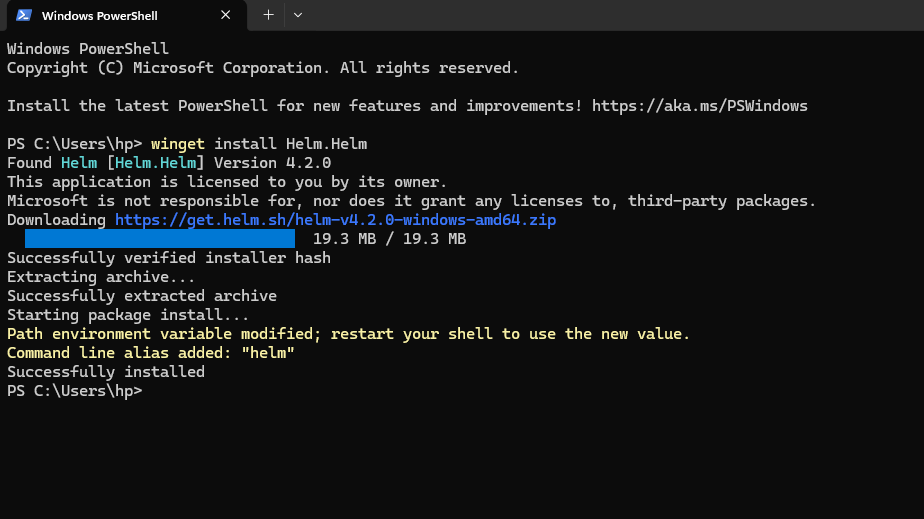
Fig 1: winget installing Helm 4.2.0 successfully in PowerShell.
Helm 4.2.0 installed as a system command. But I still needed it inside my Git Bash session without restarting the shell. unzip refused the zip file with a permission error, so I pulled v3.14.0 manually and extracted it through PowerShell from inside Git Bash.
curl -LO https://get.helm.sh/helm-v3.14.0-windows-amd64.zip
powershell -Command "Expand-Archive -Path helm-v3.14.0-windows-amd64.zip -DestinationPath ."
mv windows-amd64/helm.exe ./helm.exe
./helm worked. I added the Prometheus community chart repo and deployed kube-prometheus-stack.
$ ./helm install prometheus prometheus-community/kube-prometheus-stack
NAME: prometheus
STATUS: deployed
REVISION: 1
The ServiceMonitor then applied cleanly once the CRDs were in the cluster.
$ kubectl apply -f kubernetes/servicemonitor.yaml
servicemonitor.monitoring.coreos.com/simple-model-api-monitor created
Wall 2: the metrics endpoint does not exist
I port-forwarded to the service and hit the metrics route.
$ curl http://localhost:8080/metrics
{"detail":"Not Found"}
The application does not expose a /metrics endpoint. Prometheus has nothing to scrape. I have not added it yet.
Wall 3: the build hangs
I needed to rebuild the image inside the Minikube Docker daemon. It ran for 3,509 seconds — nearly an hour — before I cancelled it.
=> [builder 4/5] RUN python -m venv /opt/venv && \\
     /opt/venv/bin/pip install ...  3489.3s
ERROR: failed to build: failed to solve: Canceled: context canceled
I deleted the cluster, gave Minikube 4 CPUs and 8GB of RAM, and tried again.
minikube delete
minikube start --cpus=4 --memory=8192
eval $(minikube docker-env)
docker build -t simple-model-api:latest .
Same result. Pip stalled again at the same layer. 1,111 seconds this time before I killed it.
=> [builder 4/5] RUN python -m venv /opt/venv && \\
     /opt/venv/bin/pip install ...  1096.0s
ERROR: failed to build: failed to solve: Canceled: context canceled
I stopped the cluster.
$ minikube stop
🛑  1 node stopped.
Where this sits
| Problem | Status |
|---|---|
| Helm installed | Done |
| Prometheus + CRDs in cluster | Done |
| ServiceMonitor registered | Done |
/metrics endpoint in app | Not started |
| Docker build inside Minikube | Hanging every time |
The build hangs every time pip touches the network inside Minikube’s internal daemon. Tomorrow I find out why.